Run the counter. Understand the whole food business
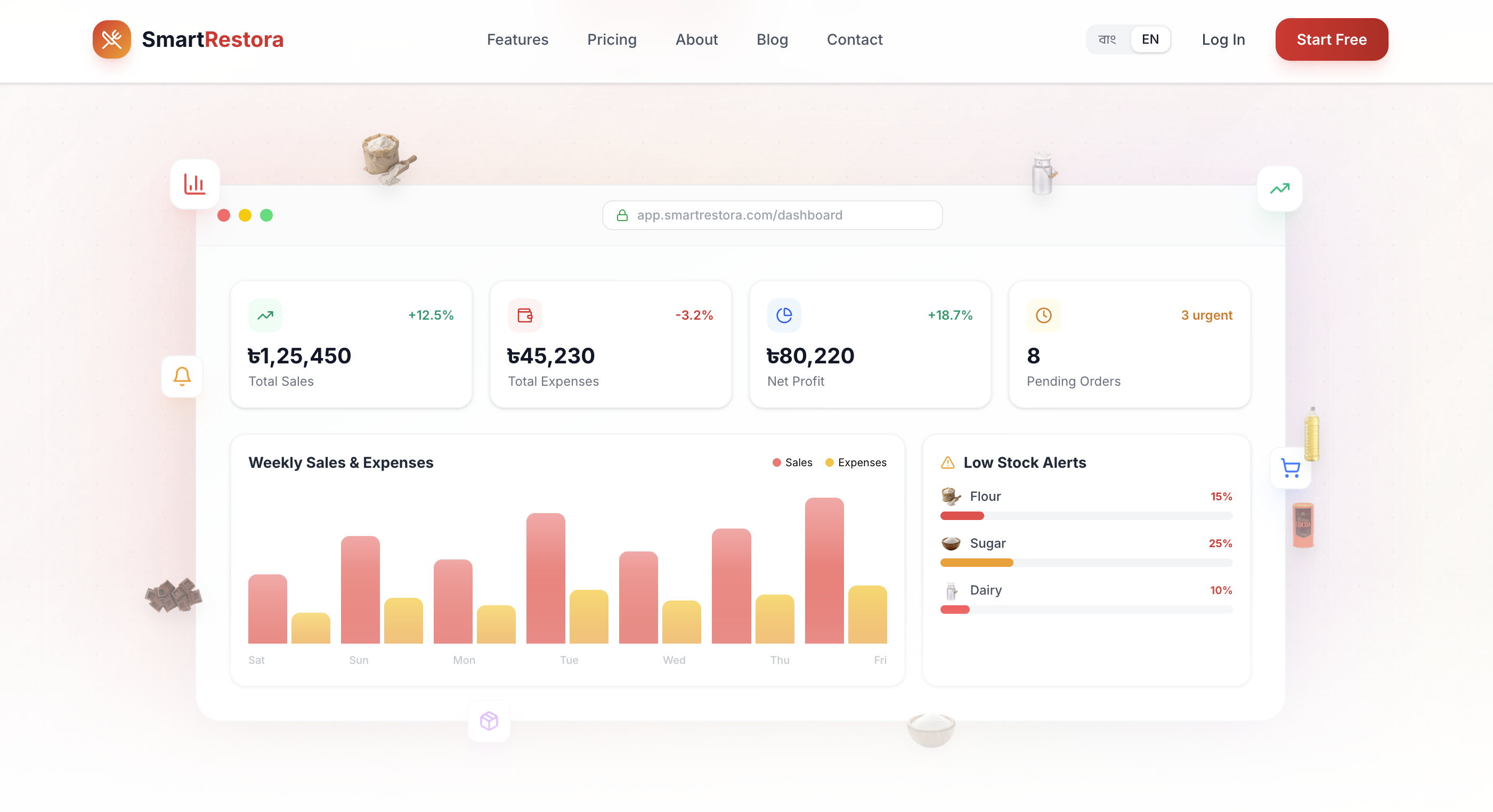
Net Profit
৳80,220
Today's Sales
৳1,25,450
A sale is only one part of the day.
Connect the work that happens before and after every transaction.
Counter sales live in one place; stock is checked elsewhere.
Sales and stock are recorded in connected workflows.
Ingredient use is hard to relate to what was produced.
Recipes and production batches document inputs and outputs.
Owners calculate the week after it has passed.
Reports organize sales, purchase, expense, stock, staff, due, and financial views.
Orders arrive through multiple conversations.
Online orders and pre-orders have a structured operational home.
From purchase to plate, with fewer blind spots.
SmartRestora organizes the recurring flow of a food business. Buy ingredients, track stock, produce items, take orders, complete sales, and review the numbers that need attention.
Buy
Suppliers, purchase records, received items, and dues.
Stock
Raw materials, finished goods, variants, counts, minimum levels, and adjustments.
Produce
Recipes, ingredient consumption, batch output, and costing inputs.
Sell
POS, receipts, discounts, taxes, customers, payment method, and sales history.
Review
Revenue, costs, expenses, product movement, payment mix, and operational exceptions.
SmartRestora workflow consists of five steps:
- Buy: Suppliers, purchase records, received items, and dues.
- Stock: Raw materials, finished goods, variants, counts, minimum levels, and adjustments.
- Produce: Recipes, ingredient consumption, batch output, and costing inputs.
- Sell: POS, receipts, discounts, taxes, customers, payment method, and sales history.
- Review: Revenue, costs, expenses, product movement, payment mix, and operational exceptions.
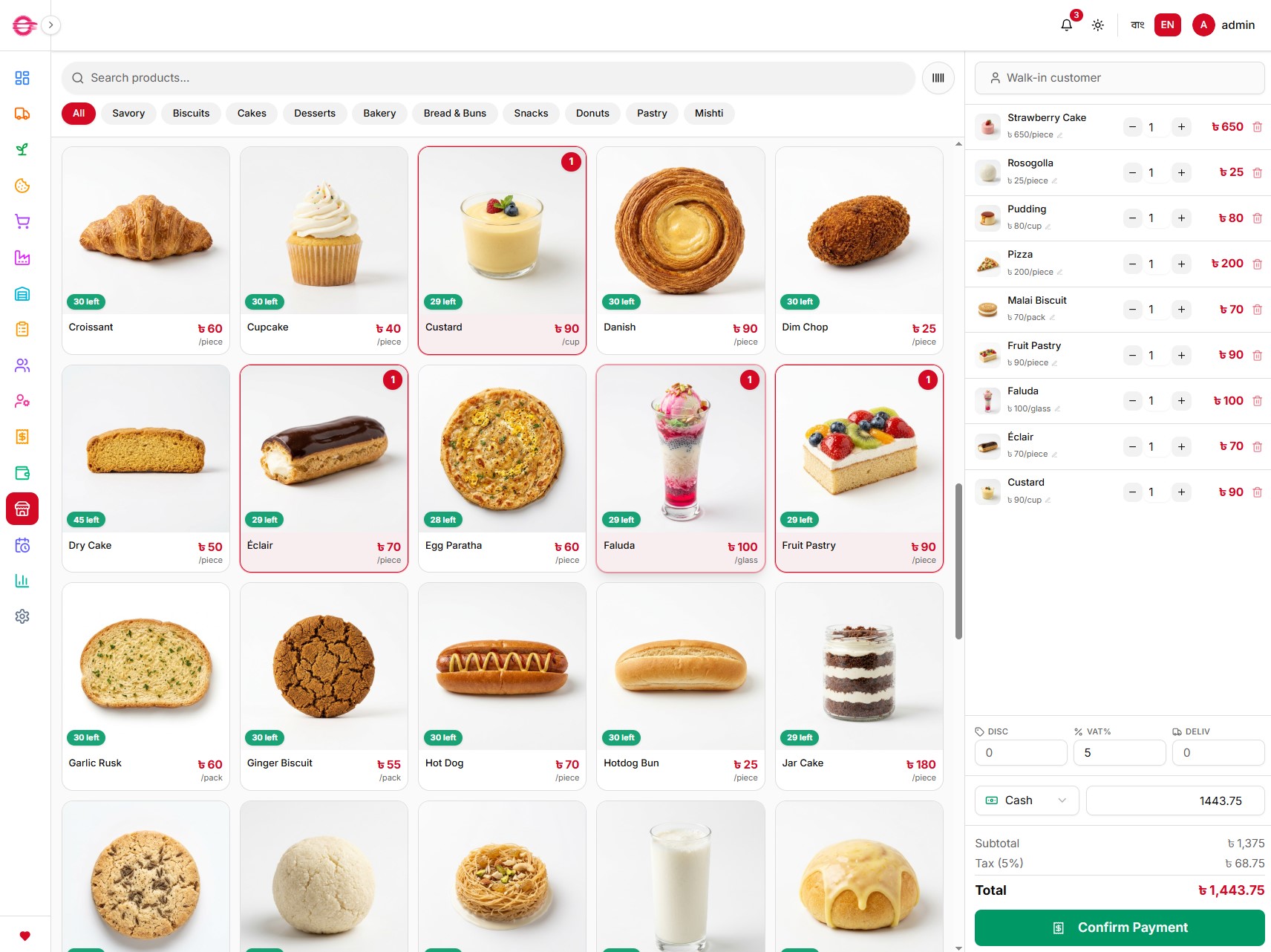
A POS built for the rush at the counter.
Give the cashier a focused way to find items, choose variants, add a customer when needed, apply allowed discounts and tax, record the payment method, and produce a receipt. Managers retain the sales history needed to review what happened later.
Finished goods, categories, variants, barcodes, SKUs, and pricing inputs
Quantity, discount, tax, delivery charge, payment and paid-amount records
Customer-linked and walk-in sale records
Receipt and sales-history workflows
Know what you have—and what it took to make it.
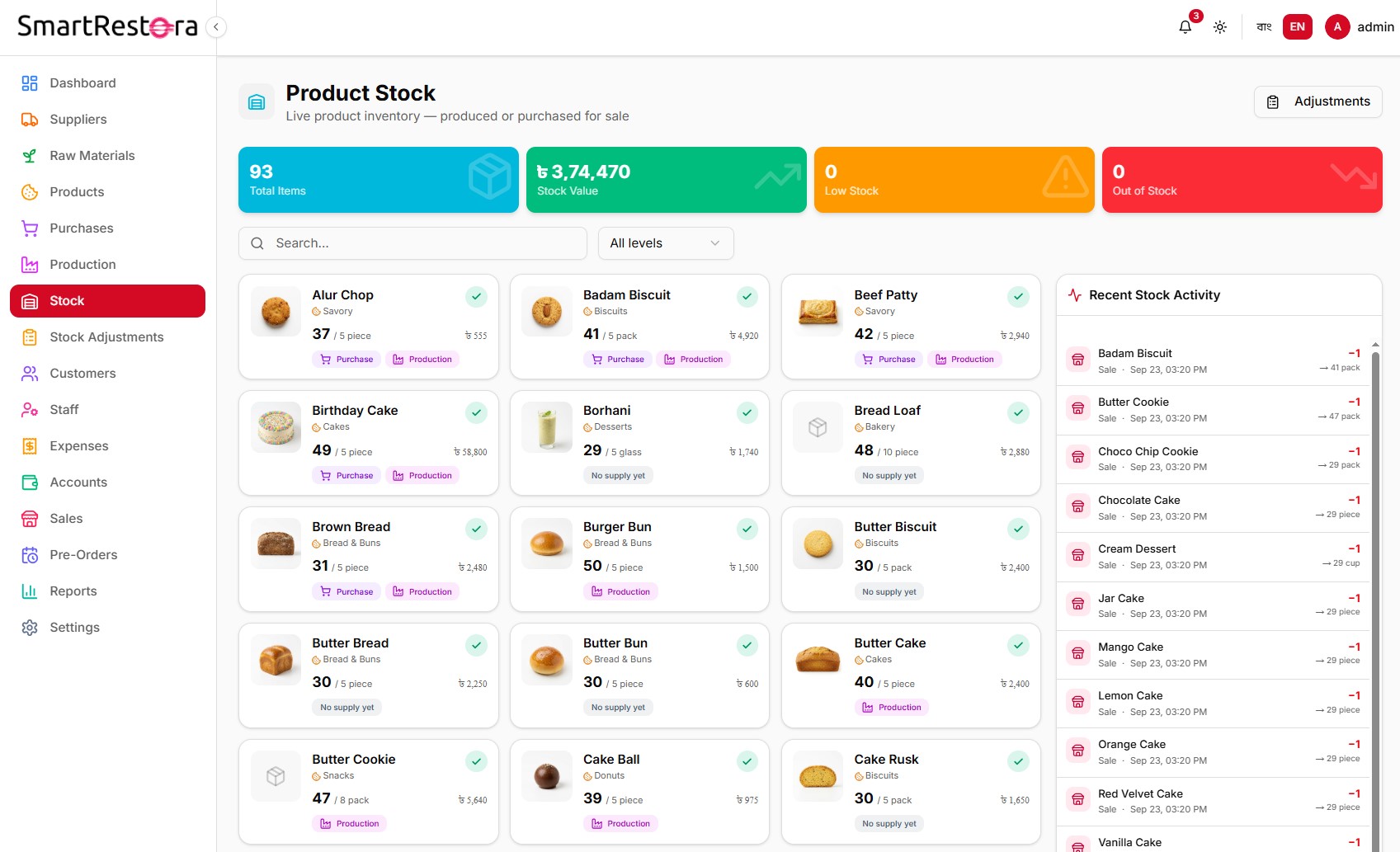
Food inventory is more than a count of menu items. SmartRestora separates raw materials from finished goods, records stock movement, supports product variants, and gives production teams a way to record recipe inputs and batch outputs.
Minimum-stock thresholds and visible low/out-of-stock status
Purchase records that add to inventory when completed
Stock adjustments with a reason trail
Recipe ingredients, expected yield, batch consumption, and finished-product output
Product and variant cost fields for accurate reporting
Turn transactions into questions worth answering.
The goal of reporting is not more dashboards. It is a clearer next decision: Which day changed? What sold? Which payment method was used? Where is cash committed? Which stock needs attention?
SmartRestora calculates reporting views from the organization's own sales, purchases, expenses, and stock records. Keep purchase costs, product costs, and expenses current so profit-related views are meaningful.
Total Revenue
৳1,25,450
Orders Today
142
Low Stock Items
8
Avg. Order Time
4.2 min
Revenue Trend
Daily revenue
Category Performance
By product
Payment Mix
By method
Configured around how you serve food.
Restaurants
Record fast service, organize purchases and stock, and review the business day by day.
Bakeries & Confectioneries
Connect ingredients, recipes, production batches, pre-orders, and finished products.
Cafés & Tea Stalls
Start with a focused POS, daily sales records, and simple stock visibility.
Catering & Cloud Kitchens
Plan advance work, organize bulk orders, and manage a growing operations workflow.
Frequently asked questions
Common questions about SmartRestora POS and restaurant management.
SmartRestora POS is part of a restaurant operations platform for Bangladesh. It helps food businesses record sales and organize the related work around inventory, purchases, production, orders, expenses, staff, and reports in Bengali or English.
SmartRestora is designed for restaurants, bakeries, cafés, caterers, and cloud kitchens that want a clearer way to run daily operations. The right setup depends on the business's menu, inventory, sales channels, team roles, and reporting needs.
Yes. In addition to sale recording, SmartRestora includes workflows for suppliers and purchases, inventory, recipes and production, expenses, pre-orders, online orders, staff, and operational reporting. Availability can vary by plan and configuration.
SmartRestora can record raw materials and finished goods, minimum stock levels, stock adjustments, purchases, recipes, production inputs, and batch output. Accurate inventory and cost reporting depends on the team keeping those records current.
SmartRestora supports Bengali and English interfaces. Product labels, business data, and the customer-facing storefront should be reviewed in both languages before launch so that the experience remains accurate for the team and customers.
For the selected period, the analytics workflow separates revenue, net sales, product cost (COGS), expenses, gross profit, and net profit. Profit-related figures are most reliable when product or variant costs and expenses are complete; cost coverage should be reviewed alongside the result.
Discuss multi-branch reporting, roles, onboarding, and integrations with the SmartRestora team. These capabilities may depend on the selected plan and the exact business workflow.
SmartRestora POS Frequently Asked Questions
- What is SmartRestora POS?
- SmartRestora POS is part of a restaurant operations platform for Bangladesh. It helps food businesses record sales and organize the related work around inventory, purchases, production, orders, expenses, staff, and reports in Bengali or English.
- Who is SmartRestora for?
- SmartRestora is designed for restaurants, bakeries, cafés, caterers, and cloud kitchens that want a clearer way to run daily operations. The right setup depends on the business's menu, inventory, sales channels, team roles, and reporting needs.
- Does SmartRestora include more than checkout?
- Yes. In addition to sale recording, SmartRestora includes workflows for suppliers and purchases, inventory, recipes and production, expenses, pre-orders, online orders, staff, and operational reporting. Availability can vary by plan and configuration.
- Can SmartRestora help track restaurant inventory?
- SmartRestora can record raw materials and finished goods, minimum stock levels, stock adjustments, purchases, recipes, production inputs, and batch output. Accurate inventory and cost reporting depends on the team keeping those records current.
- Does SmartRestora work in Bengali?
- SmartRestora supports Bengali and English interfaces. Product labels, business data, and the customer-facing storefront should be reviewed in both languages before launch so that the experience remains accurate for the team and customers.
- How does SmartRestora calculate profit-related reporting?
- For the selected period, the analytics workflow separates revenue, net sales, product cost (COGS), expenses, gross profit, and net profit. Profit-related figures are most reliable when product or variant costs and expenses are complete; cost coverage should be reviewed alongside the result.
- Can SmartRestora support multiple branches or integrations?
- Discuss multi-branch reporting, roles, onboarding, and integrations with the SmartRestora team. These capabilities may depend on the selected plan and the exact business workflow.
See SmartRestora with your own workflow in mind.
Whether you are setting up your first counter or organizing a growing food operation, start with the parts of the day that create the most manual follow-up. We will help you map the right setup.